This is default featured slide 1 title

Go to Blogger edit html and find these sentences.Now replace these sentences with your own descriptions..

This is default featured slide 2 title

Go to Blogger edit html and find these sentences.Now replace these sentences with your own descriptions..

This is default featured slide 3 title

Go to Blogger edit html and find these sentences.Now replace these sentences with your own descriptions..

This is default featured slide 4 title

Go to Blogger edit html and find these sentences.Now replace these sentences with your own descriptions..

This is default featured slide 5 title

Go to Blogger edit html and find these sentences.Now replace these sentences with your own descriptions..

Search This Blog

Showing posts with label tutorials. Show all posts

Tuesday, July 26, 2011

Silhouette Portraits


I was so inspired by a wall art project on mousehouse the other day that I couldn't wait to do something similar but personalised. After a week of mulling it over, a bird on fabric became... my kids on paper! I did it a bit different to other tutorials I have seen so here's my steps in case you want to do one too (and there's lots of other project ideas at Our Creative Spaces).


First you need some profile photos... I found bathtime was easiest for this! Because I was doing two, I wanted them similar sizes, so I just opened both pics in a Word document and played with the sizes until they were similar and fitted on an A4 page (if you are a Photoshop ninja you could of course go straight to drawing an outline but I did it old school).


I like working with stencils, so you can try again when you stuff up use them again - I keep food boxes to use for this as they are nice light cardboard, just paste your printed photos (from your A4 Word document) on to the cardboard and when the paste is dry carefully cut out the heads (I changed some details with ballpoint pen first, like giving them necks!)

Then decide which way you want them facing, I wanted the finished pictures to look to the right, so I used the stencils pointing to the left (the photo-pasted side is facing down). Trace around on black paper (I got some nice matte black paper from an art shop for 35c) in ballpoint, add a soft point below each neck, then cut out carefully with small sharp scissors.


Once you have cut out the shapes, turn them over and you can play around with colour, yay! I was going to use scrapbooking paper but found this pack of mixed A4 paper on sale (wrapping paper or wallpaper would be good too). I had planned to use bright colours but Miss 4 insisted on the gold.

Then you just need to attach the black piece of paper - paste might make wrinkles so doublesided tape or a glue-snail is easiest.


Because I did two pictures on an A4 to start with, each one now fits nicely on to an A4 backing, and A4 frames can be cheaper to buy than other sizes (sometimes they are called certificate or display frames). 

Other wall art posts we have done...

Monday, February 21, 2011

I {heart} re-designing - Felt Tip Couture Shoes

We love customising and re-designing, but it never occurred to me that shoes could be customised too! You can draw straight on to canvas shoes with the right pens and it is SO much fun.


This tutorial on The Craft Revival used kids shoes, but I thought I would try some adult ones... inspired by this Wonder Woman* patch, I drew some bold shapes (first in pencil, then black) and then just coloured in like a colouring book - fun! I love how the blue has come out looking like denim.


Of course the pens are going to go further on small shoes... I left the sides plain white so I wasn't just using up ink (I think I will do some stars on the back panel).


The pens are Faber-Castell Pitt Artist Pens and I found them in an art shop - the colours are in packs and work out to be about $5 each, but you could buy a single black one and try monochrome too (the key is that they are waterproof once dry). I'm not sure how far they will go - I am going to try some for Miss 4 next.
*Like Strawberry Shortcake dolls, the Wonder Woman TV series is one of my most vivid childhood memories - and it is about to be re-made...

Wednesday, February 16, 2011

My Creative Space - Pooh Messenger Bag

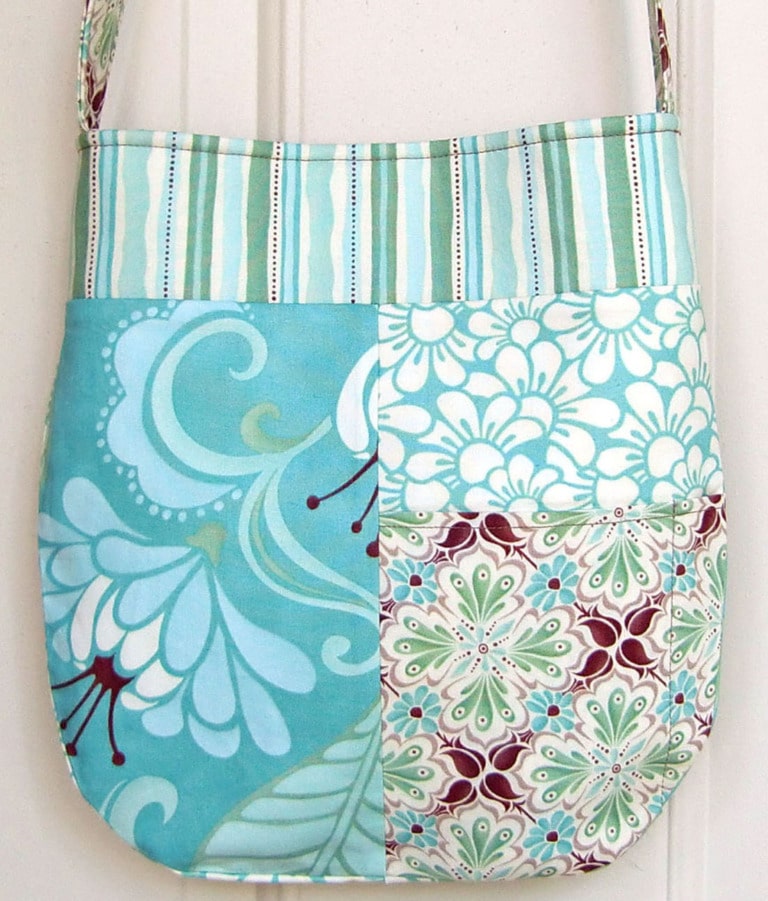
I love messenger bags and have found another awesome tutorial - my first bag project was this easy tote. This time it was a surprise for Miss 4, who has been using shopping bags to imitate my shoulder-bag ever since I went back to my part-time job a few months ago ("Bye mum, I'm off to work").


She is obsessed with Winnie the Pooh (unavoidable really as I am too and have been brainwashing her since birth), so I have combined denim offcuts with some Pooh accents. If you do not recognise the applique on the flap, it is from the TV series 'My Friends Tigger and Pooh', which has little in common with the original stories but involves 'super-sleuthing' mysteries. It was a very easy applique, just a question-mark shape I already had from my t-shirts, plus a triangle with rounded corners.


The lining fabric was leftover from a pinboard Aimee made my daughter as a baby shower present (see - since birth!) and Spotlight had the Pooh and Tigger twill tape in a clearance a few weeks ago. I followed the tutorial pretty closely and just made the strap approximately 2/3 the original length so it was child-sized.


It was so much fun that I am trying to figure out what I would like on one for myself - applique? some patchwork? The beauty of the messenger bag is you can embellish the flap however you want. Thanks mmmcrafts for a great tutorial.

Around 200 creative spaces are on show every week at http://www.kootoyoo.com/.

p.s. If you are not a sewer but would like to get a messenger-style bag for a little person you know, these gorgeous ones are currently on sale...

p.p.s. I love these bags by the very clever Cat Taylor

Wednesday, February 2, 2011

My Creative Space - Easy Ribbon Necklace

A 2 year-old's birthday gave me the excuse to try this awesome tutorial from Prudent Baby, and it is just the kind of small, fiddly project I like.


She doesn't usually wear pink so I went with purple and blue, a pale blush and some craft ribbon with flowers. All you have to do is sew each loop on your machine, then tidy up the join by melting the ends back on to the back of the loop (don't worry, it is explained much better in the tutorial!)


Instead of a ribbon tie at each end, I used one main ribbon and sewed it on to both of the end loops, so the 2 year old could just pull the necklace on and off without worrying about it coming untied.

Let us know if you try this one yourself - it took me about half an hour - and check out this grown-up looking version from Prudent Baby (one of our favourite blogs by the way, they also had the dress tutorial Aimee used here).


The creative space game is back for 2011 at www.kootoyoo.com, check it out!

p.s. you could also use this idea for ribbon (or fabric) scraps left over from other projects, so I will call it a re-design too!

Wednesday, November 10, 2010

My Creative Space - Easy Tote Bag

I must have read 30 tote bag tutorials in the last couple of weeks but this one really caught my eye and so I have given it a try... I don't think I have the patience to ever make something as clever as Estella Rose's gorgeous bags or Aimee's Sew Inspired handbag, but I liked the idea of something plain I could applique, that could possibly come out good enough to be a gift...


Because it was my first try, I used material on hand instead of splurging, and I had a piece of denim approx 90cm x 40cm so that became the outer of the bag (folded in half lengthways). The lining is leftover fabric from when I made my husband a shirt many years ago. Colourfool's tutorial is very funny (the title is 'The Greatest Bag Tutorial EVER?') and absolutely written for beginners.


I had another piece of denim for a pocket and used The Longest Year's tutorial for tips. I have been trying to figure out a strawberry design in my head for a while and this is my first attempt at actually doing one, I was quite pleased with it.


So this is the finished product, I made the straps quite long for some reason but it is definitely a tote bag, yay!


We love taking turns doing Creative Space on Thursdays, you can see other people's at Kootoyoo.


p.s. During my 'research' I came across http://www.lazygirldesigns.com/, they sell patterns for gorgeous bags, the Lily Pocket Purse may have to be a future project...

Wednesday, September 1, 2010

My creative space: it's not about fabric!


Following all the links to the wonderful crafty people in last week's 'My Creative Space' bloggy game, I came across Megan from Mousehouse's awesome blog. Megan is a wonderful sharer of great ideas and has some neat tutorials on there. I couldn't wait to get started and spent most of the weekend on some non-fabric related crafts. It's been about 3 months since I last picked up my photos, scrapbooking stuff and paint brush because I've been so busy with the launch of lily pad d's...so thanks heaps Megan for the inspiration!


I had my heart set on the Personalised Children's Art Idea - where you overlay a photo of your child with text that acts like a time capsule and records things about them at their current age. I had a head-start because I was recently given electronic copies of my two girls' professional photos, taken when we stood in and pretended to be models for my friend's small New Zealand merino clothes business, billi tees. But I had a few technical difficulties, because unfortunately I don't have Photoshop or Pages or a specific photo/graphics programme.


Instead what I ended up doing was importing my photos into simple old Powerpoint. I've had heaps of success making home-made Christmas cards and party invites in Powerpoint, because you can position pictures and words wherever you want and move and layer things freely. You can either print straight to your printer, or save a slide as a 'jpg' and email it around. Powerpoint can't do flash things like 'white out' areas though, so instead of 'whiting out' my girls clothes like Megan does, I just positioned the text on the plain background, printed and then cut the photos to size to fit my frame. I still think it looks cool.


After that, I wanted to try to copy the idea of photo blocks, which I've seen recently on a friend's wall. These are made of images glued onto wooden MDF blocks, and are hugely expensive to be done commercially. My take on it was to buy a double set of little square canvases (from the Warehouse, for $2 for the set). I painted the sides of the canvases black, then printed the photos from a slide in Powerpoint. I'd positioned the photos how I wanted them and to the right size. Now I'm up to the stage of varnishing the photos and canvases, to give it a 'pro' look. I'd love some advice actually. Shall I use my paintbrush, or maybe a small roller?


Happy cs space everyone!